The DeepSeek Harness GitHub Repository: What Is Actually Inside deepseek-ai/deepseek-harness
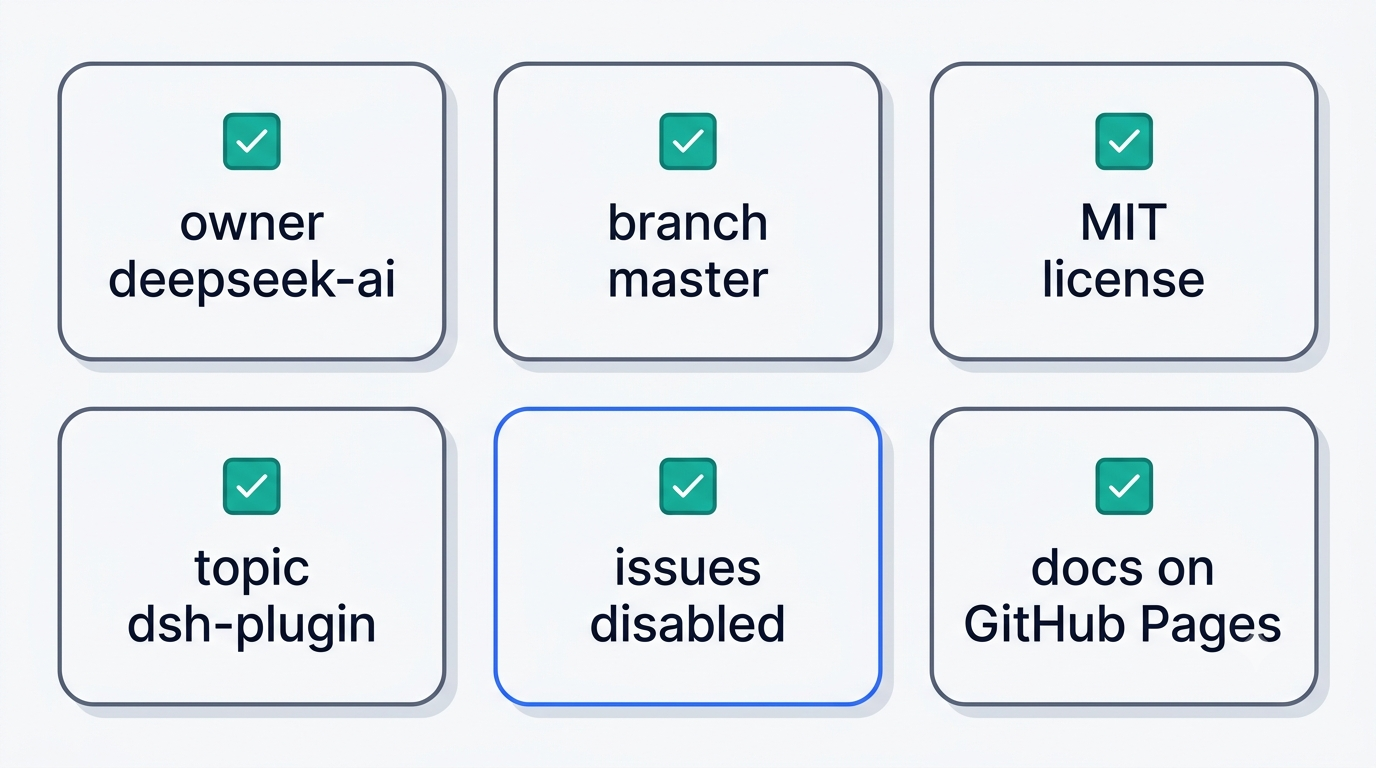
The canonical address is github.com/deepseek-ai/deepseek-harness, a single monorepo released under the MIT License. Everything else that shows up in search results for DeepSeek Harness — forks, mirrors, wrapper packages — is a copy, not the source.
This guide is part of the DeepSeek Harness field guide. DSH Field Guide is an independent community resource; it is not affiliated with, endorsed by, or operated by DeepSeek. “DeepSeek” and “DeepSeek Harness” are trademarks of their owner.
How to Tell the Official Repository from the Forks
The organization behind the project is deepseek-ai, and the repository name is deepseek-harness. Anything hosted under a different account, no matter how close the name looks, is not the source that DeepSeek AI maintains directly.
The canonical address and its fingerprints
The repository description reads, word for word, “DeepSeek Harness: Everything is a Plugin.” The homepage field points to deepseek.com/harness, and the default branch is master. Its GitHub topics are ai-agents, cordis, dsh, and dsh-plugin — all four together are a reliable fingerprint that you’re on the real dsh repo, not on someone’s clone. With 24,639 forks as of 3 September 2026, copies genuinely are everywhere in the wild, which is exactly why checking the owner field matters more than checking the name.
Why the name is ambiguous
The bare term overlaps with several unrelated things — pet gear, automotive wiring, an unrelated developer tool with a similar-sounding name, medical abbreviations. In search queries and in writing, spell it out in full: DeepSeek Harness, or the short form dsh. Neither the DeepSeek Harness project nor this guide uses that ambiguous word to mean the product.
Repository Metrics and What They Say About Maturity
Raw numbers tell only part of the story here, and the two halves point in different directions.
The numbers as of 3 September 2026
The repository carries 210,610 stars, 24,639 forks, and 905 watchers, with a tree size of 134,768 KB and TypeScript as the primary language.
| Metric | Value (3 Sept 2026) |
|---|---|
| Stars | 210,610 |
| Forks | 24,639 |
| Watchers | 905 |
| Tree size | 134,768 KB |
| Primary language | TypeScript |
| Default branch | master |
The repository itself was created on 13 August 2026, but the earliest visible commit in its public history is dated 14 August 2026, 12:18:39 UTC — the pre-release commit history simply wasn’t published, so the first commit lands a day after the repository’s creation timestamp.
Stars are not maturity
Star count measures interest, not code stability. The version field in the root package.json currently reads 0.1.2-rc.1, and the project is officially in developer preview. The README warns, in capital letters, about compatibility-breaking changes and points readers to SAFETY.md for details. A quarter-million stars says people are watching closely; the version number says the API underneath is still moving.
Release Timeline: 0.1, 0.1.1, 0.1.2-rc.1
Three tagged releases landed inside three weeks, and the dates matter more than usual because commands and config from one version can stop working in the next.
The release date, settled
DeepSeek Harness went public on 13 August 2026, the same day DeepSeek shipped V4-Pro-0813. At 11:56 UTC the repository was created, and hours later the official account posted the launch announcement:
DeepSeek Harness v0.1 is now available in Developer Preview!@deepseek_ai
DeepSeek Harness capabilities had already shipped quietly inside the 31 July V4 release, before there was a standalone product or public source. The first commit visible in the public git history is dated 14 August, which is why some Chinese write-ups give that as the open-source date. For the record, 13 August 2026 is the date to cite.
Cadence
Version 0.1 shipped on 13 August as the Developer Preview launch. Version 0.1.1 followed on 21 August, released together with the V4-Flash-Vision-Exp model. Version 0.1.2-rc.1 is the tag current as of 3 September. Three releases in three weeks means anyone following DeepSeek Harness closely should treat commands, flags, and sample configs as perishable rather than fixed.
Inside the Monorepo: apps, packages, docs, python, native
The repository is organized as a single monorepo rather than a scattered set of separate projects, and its top-level layout signals how the project is actually built and maintained.
Top-level layout
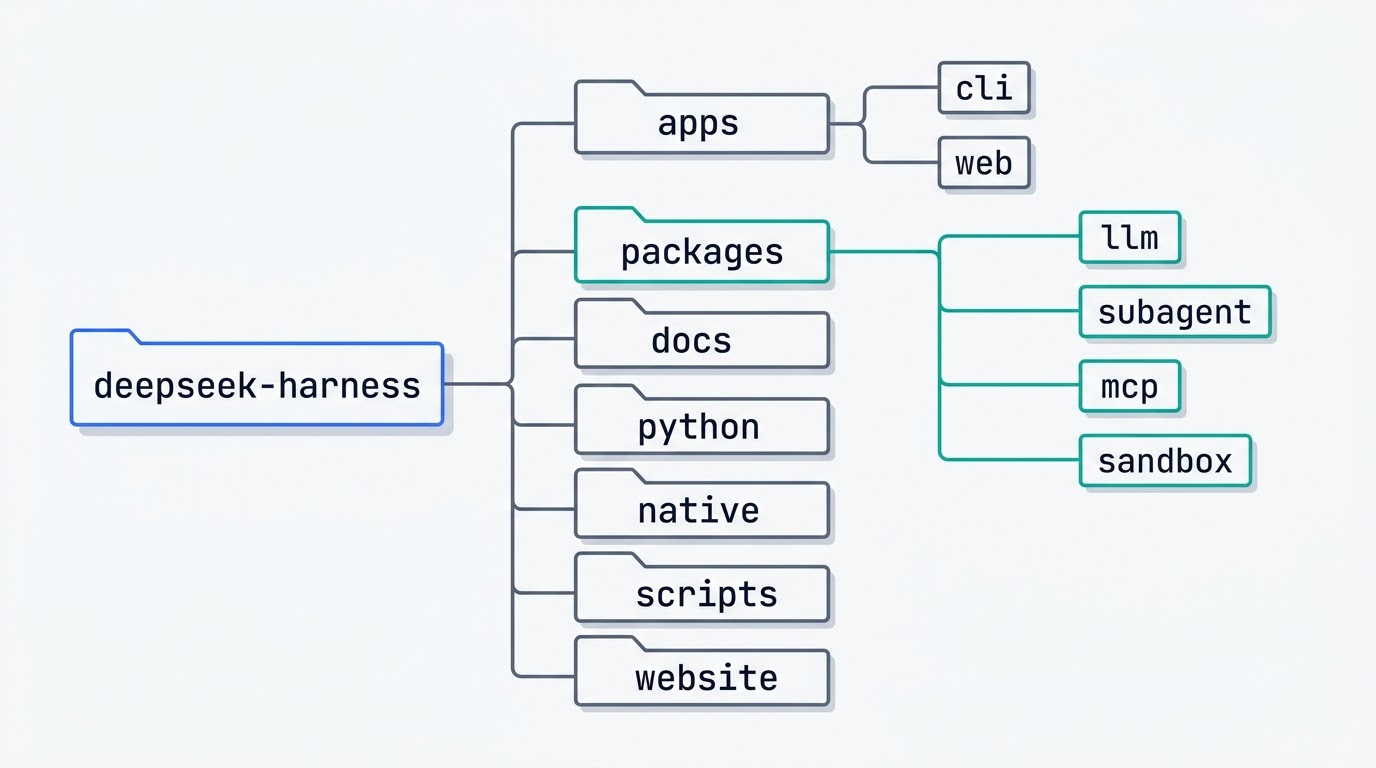
The top-level directories are .agents, .claude, .github, apps, docs, native, packages, patches, python, scripts, snapshots, vendor, and website. Inside apps/ there are exactly two applications: cli and web.
The 47 package groups
packages/ holds 47 top-level groups. Among them: llm, subagent, acp, extensions, mcp, sandbox, sdk, workflow, and credentials.
- subagent bundles subagent-claude-code, subagent-codex, subagent-acp, subagent-dsh-sdk, and subagent-fork-in-process — meaning Claude Code and Codex can be called as child-process subagents straight out of the box.
- llm bundles llm-deepseek and llm-pi-ai, with the latter built on top of
@earendil-works/pi-aiand capable of OAuth login plus OpenAI-compatible self-hosted gateways. - mcp and sandbox cover Model Context Protocol integration and isolated execution respectively, the two pieces that let dsh call external tools without trusting them blindly.
The repository documents its own AI workflow
CLAUDE.md and AGENTS.md sit in the repository root, alongside a .claude directory. The project is openly built with AI-agent assistance, and the instructions those agents follow live in the same tree that ships the product — a detail that says as much about how DeepSeek Harness is developed as any changelog entry would.
Running It: From npm and From Source
Two paths exist to get dsh running locally, and picking the right one depends on the machine. If this is a first encounter with the tool, the DeepSeek Harness guide covers what the runtime actually does before any of the commands below will make sense.
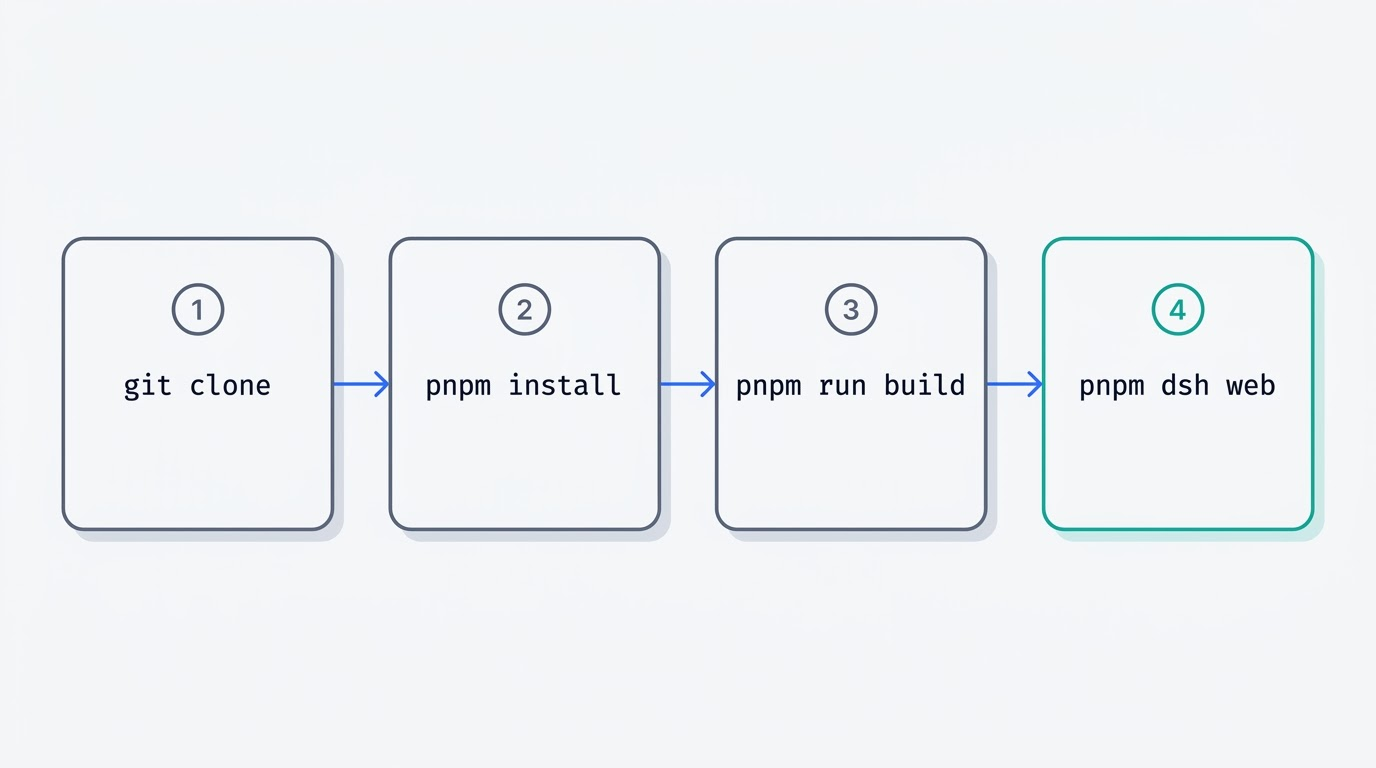
1. Check Node.js version. DeepSeek Harness requires engines.node ^22.19.0 || >=24.0.0 per the root package.json; confirm with node -v before anything else.2. Pick npm or source. For a quick look, npx is enough; for ongoing development, clone the repository instead.3. Run via npx. npx @deepseek-ai/dsh web pulls the package and starts the Web UI directly.4. Or clone the source. git clone the repository, then move into the directory.5. Install with pnpm. Run pnpm install — the project pins packageManager [email protected].6. Build. pnpm run build prepares the compiled artifacts.7. Start the web app. pnpm dsh web serves the already-built artifacts without rebuilding.
From npm
npx @deepseek-ai/dsh web starts the Web UI on http://127.0.0.1:3080 and opens a browser automatically on a local machine. Over SSH, only the address gets printed, because the forwarded port belongs to the SSH client or the remote editor, not to dsh itself. The --no-open flag disables the automatic browser launch.
From source
The sequence is git clone, then pnpm install, then pnpm run build, then pnpm dsh web. pnpm run build produces the compiled artifacts once; pnpm dsh web reuses them without rebuilding on every start. Node.js itself must satisfy engines.node ^22.19.0 || >=24.0.0, and the package manager is locked to packageManager [email protected].
The npx trap
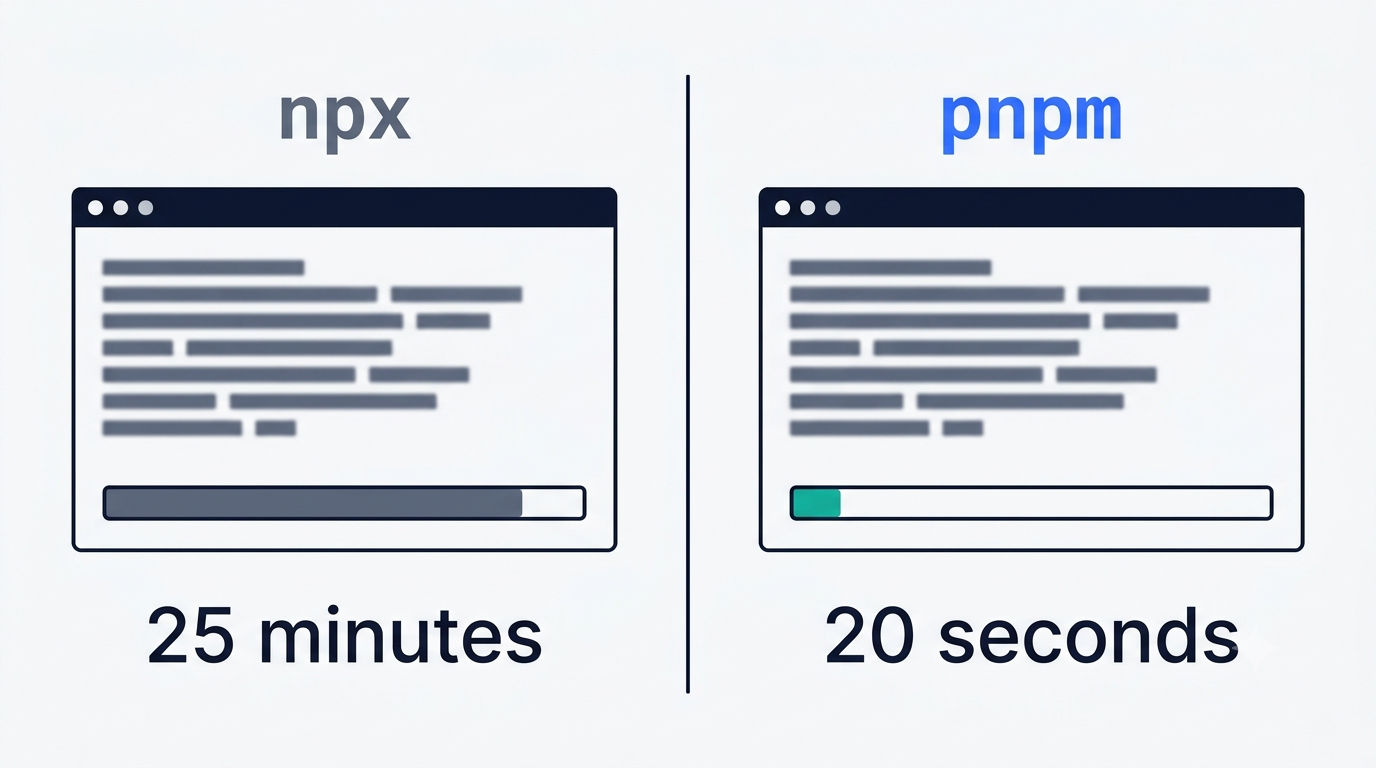
Discussions regularly surface reports of a JavaScript heap out-of-memory crash while npx resolves dependencies, and on Windows, installs through npx can take around 25 minutes even with a warm cache, against roughly 20 seconds through pnpm on the same tree. The practical takeaway is to install via pnpm rather than npx on Windows and on machines with 4 GB of RAM.
Why You Cannot Open an Issue — and Where to Report Bugs
Anyone arriving from a normal GitHub project expects an Issues tab. DeepSeek Harness doesn’t have one, and that’s a deliberate design choice, not an oversight.
Issues and pull requests are off
The repository has has_issues: false and has_pull_requests: false, while has_discussions: true. There is no button to file an issue at all. The entire public stream of bugs, questions, ideas, and plugin showcases is funnelled into one channel instead: GitHub Discussions.
The five Discussions categories
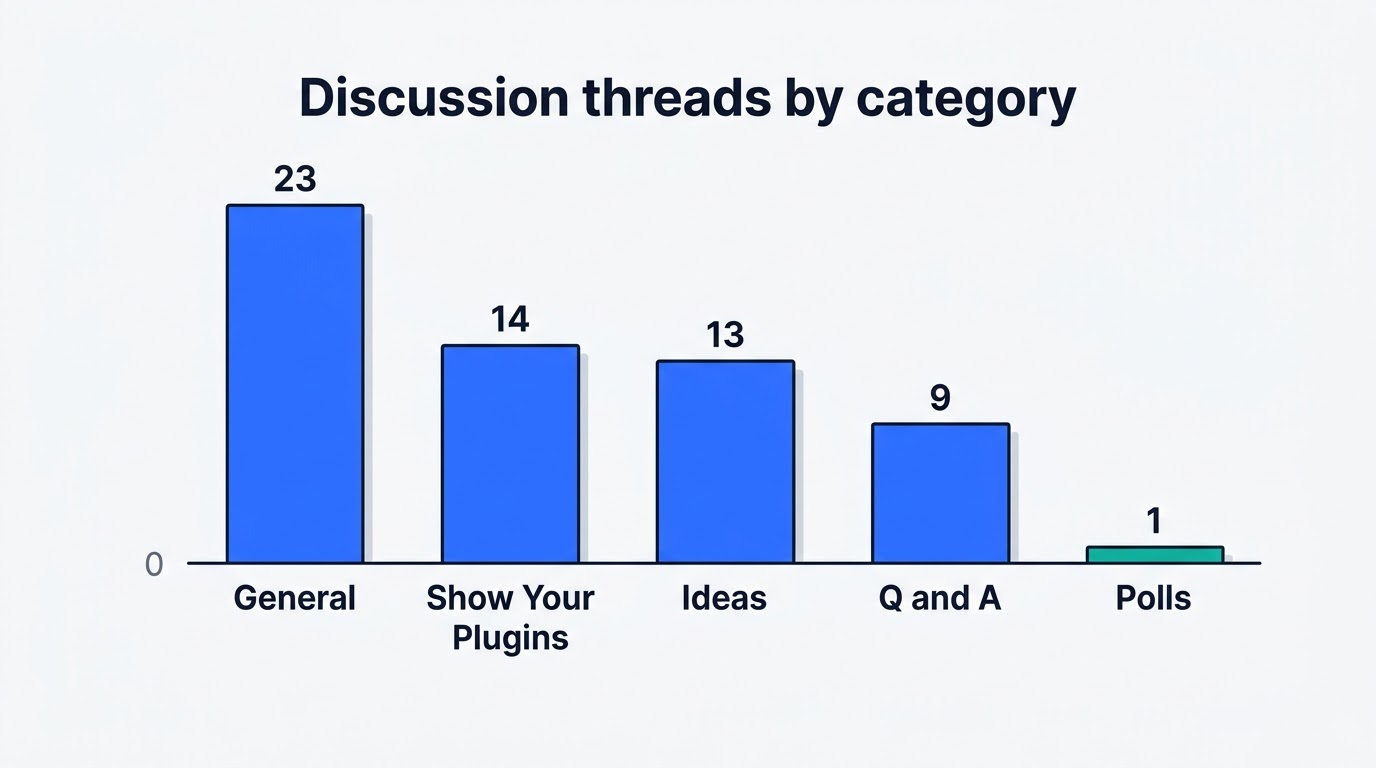
Discussions is split into five categories: General, Show Your Plugins!, Ideas, Q&A, and Polls. Across a snapshot of 60 threads on 3 September 2026, the breakdown was General 23, Show Your Plugins! 14, Ideas 13, Q&A 9, and Polls 1. The single most-discussed thread is dsh-vault, a plugin for storing encrypted credentials, with 222 comments in Ideas. The second-most active is a source-build bug — --expose-internals is required for HMR service — with 37 comments in Q&A.
It is a bilingual community
Of the 60 threads reviewed, 23 carried a Chinese-language title — roughly one in three or four. Larger technical topics are often duplicated in both languages across separate threads. The second official feedback channel, alongside Discussions, is Discord.
Documentation, the Cordis Paper and the Plugin Topic
Documentation for DeepSeek Harness is split across three places, and each one covers different ground.
Three places docs live
A dedicated GitHub Pages site lives at deepseek-harness.github.io/deepseek-harness/, bilingual, with sections for architecture, cordis-primer, tool-catalog, glossary, cookbook, postmortem, subsystems, and user. Inside the repository itself, docs/development.md and docs/architecture.md cover build and design detail, and the README rounds things out. Start with the documentation site for orientation, then go into the tree for specifics.
The paper behind the kernel
DeepSeek Harness runs on a kernel called Cordis, and its design is documented in an academic preprint: “A Programming Paradigm for Spatiotemporal Composability,” posted as arXiv 2608.25512 on 26 August 2026, authored by Yifan Shi, Wei Zhang, and Tianyi Cui of Peking University and DeepSeek-AI. It’s an unusual amount of formal rigor for an agent framework like DeepSeek Harness — most competing projects describe their core loop in a README section, not a standalone paper.
Publishing your own plugin
The README defines exactly one discoverability mechanism: tag your own repository with the GitHub topic dsh-plugin. There is no central registry — the index is assembled from that topic alone, so a plugin that skips the tag effectively stays invisible.
License: What MIT Actually Allows Here
The license question splits into two parts that are easy to conflate.
MIT on DeepSeek Harness, not on the model
The DeepSeek Harness code is released under the MIT License: it can be forked, embedded in a commercial product, modified, and redistributed, as long as the copyright notice and license text are kept intact. That permission covers the DeepSeek Harness codebase only — it does not extend to the model weights or to API access, both of which are billed separately by token usage.
Third-party notices
Dependencies pulled in by the project and their individual licenses are listed in THIRD_PARTY_NOTICES.md. Anyone embedding DeepSeek Harness in a shipped product should check that file directly rather than assuming the root LICENSE covers everything underneath it. What the licence does not answer is what the thing is for — that is the job of the dsh harness overview.