
DeepSeek Harness Plugins: What They Are, Where to Find Them, and How to Write One
In DeepSeek Harness, a plugin is not an add-on bolted onto a core — it is the only form any capability takes. The model adapter, the tool layer, the session log, and the agent loop itself are all mounted as plugins, and there is no privileged kernel underneath any of them.
DSH Field Guide is an independent community resource covering this ecosystem; it is not affiliated with, endorsed by, or operated by DeepSeek. “DeepSeek” and “DeepSeek Harness” are trademarks of their owner, who shipped the project as a public release on 13 August 2026.
That release date matters for anyone reading dsh code today: DeepSeek Harness capabilities first shipped quietly inside the 31 July DeepSeek V4 release, without a separate product or public source. The dedicated repository, deepseek-ai/deepseek-harness, went live on 13 August 2026, the same day DeepSeek shipped the DeepSeek-V4-Pro-0813 model and posted the announcement from @deepseek_ai. The earliest commit visible in the public history is dated 14 August, which is why some Chinese write-ups cite that as the open-source date — but 13 August is the date this guide, and DeepSeek’s own product page, treats as the launch.
What Counts as a Plugin
The plugin definition in dsh comes straight from its underlying framework, Cordis, and it is narrower than “any piece of extension code.”
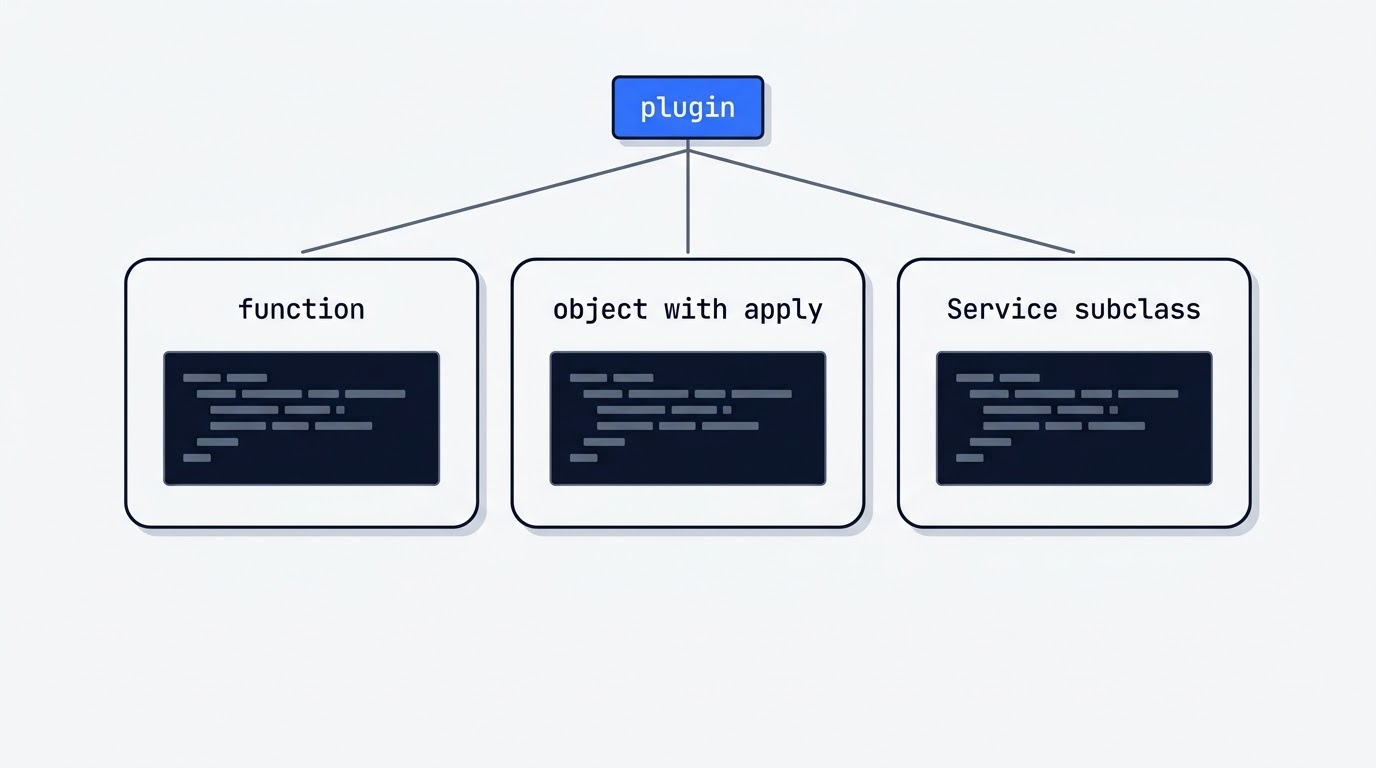
A plugin is an object that implements a Service.[Cordis primer](https://github.com/cordiverse/cordis)
That line, from the Cordis primer referenced in the DeepSeek Harness documentation, describes all three valid forms a dsh plugin can take.
The definition and the three forms
A plugin can be a function called directly with the context; an object with an apply(ctx) method and an optional name; or a subclass of Service. The minimal working case is a module with a named export called apply — name only matters for diagnostics, so it can be skipped entirely on a throwaway plugin.
There is no privileged core
Models, tools, skills, sessions, sandboxes, storage, the scheduler, and the interface are all implemented as plugins sitting next to each other. The packages/ directory ships roughly 250 packages across 50 groups — acp, core, credentials, llm, mcp, sandbox, sdk, session, skill, subagent, workflow, and more. Extending dsh means mounting your own plugin alongside those, not patching a core.
The kernel underneath
Cordis itself is a separate meta-framework for what its authors call spatiotemporal composability, formally described in the preprint arXiv 2608.25512 — roughly 8,000 GitHub stars, MIT-licensed, copyright 2021-present Shigma. It does not maintain its own public docs site; its README points readers to the cordis-primer inside the dsh documentation instead. The current core version is 4.0.0-rc.9, and its API is explicitly marked unstable.
Dependencies, Config and Cleanup: the Three Rules That Decide If a Plugin Works
Most plugins that break in practice fail for one of three mechanical reasons, and each has a fix baked into the framework rather than left to convention.
Declare dependencies with inject. Writing export const inject = ['tools'] puts a plugin in a PENDING state until every listed service exists — so the order lines appear in a config file never decides load order. The mechanism keeps working after startup too: if a required service disappears, the dependent plugin unloads, and it reloads automatically once the service comes back.
Make everything configurable through Schemastery. Config shape is declared as export const Config = Schema.object({...}), with .default() and .required() doing the validation work. An invalid config fails the plugin load with an error instead of silently getting ignored. The project convention is a simple test: if two separate deployments might reasonably want a different value, that value belongs in config — checked by asking whether it can change through cordis.yml without touching code.
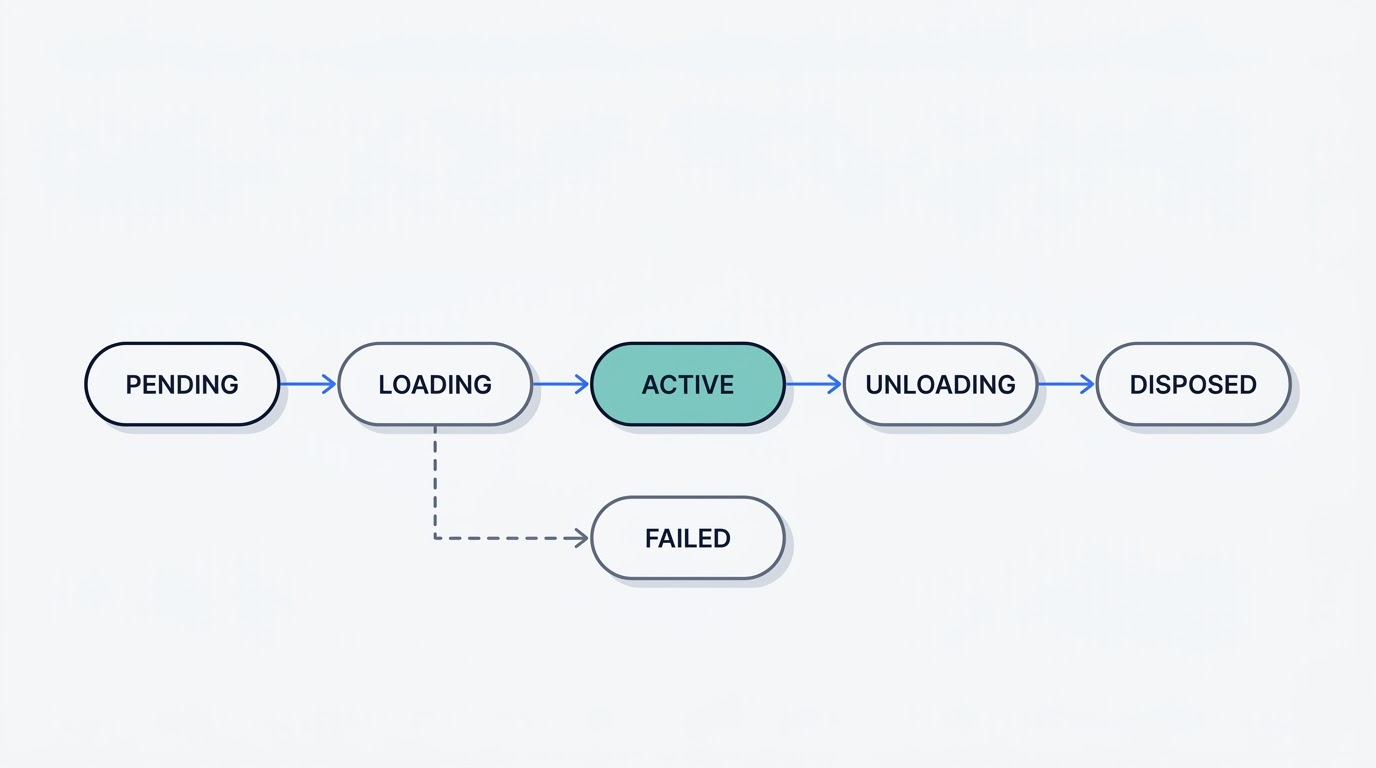
Register through ctx so unloading is free. Registrations made via the context object are effects: listeners, tools, and timers get removed automatically on unload. External resources are wrapped as ctx.effect(() => { ...; return disposer }). Calling ctx.plugin(child) returns a fiber that moves through PENDING → LOADING → ACTIVE → UNLOADING → DISPOSED, with a FAILED branch off to the side; disposers run in the reverse order of registration. Editing configuration triggers a hot reload — the old instance is torn down completely, and anything it registered outside ctx.effect leaks.
These three rules are exactly where AI-written dsh plugins tend to break: inject left undeclared, config hardcoded instead of schema-driven, resources created outside ctx.effect. The API is also still in developer preview and shifts between releases, so a snippet that worked on 0.1 is not guaranteed to compile against 0.1.2-rc.1.
Bundles and Profiles: How Configuration Is Actually Layered
Plugins don’t get installed loose — they arrive through a layering system built from two related concepts, bundles and profiles, and it’s worth knowing which one a given package actually is.
| Concept | What it is | How it’s declared |
|---|---|---|
| Bundle | An npm package that supplies a configuration layer | "dsh": {"bundle": {"patch": "./cordis.patch.yml"}} in package.json |
| Profile | A directory ($DSH_HOME/profiles/<name>) ordering bundles | dsh.profile.bundles in the profile’s own package.json |
A bundle without that dsh.bundle field in its package.json still installs as an ordinary dependency — dsh prints a warning and the configuration layer simply never activates. That single detail is the most common reason a plugin appears installed but changes nothing.
A profile is a directory at $DSH_HOME/profiles/<name> with its own package.json, where dsh.profile.bundles sets an ordered list of bundles, plus its own cordis.patch.yml. It is launched with dsh --profile <name>. The profile manifest is not meant to be hand-edited — the dsh plugin command maintains it — and no package is ever both a bundle and a profile at once.
The layer order
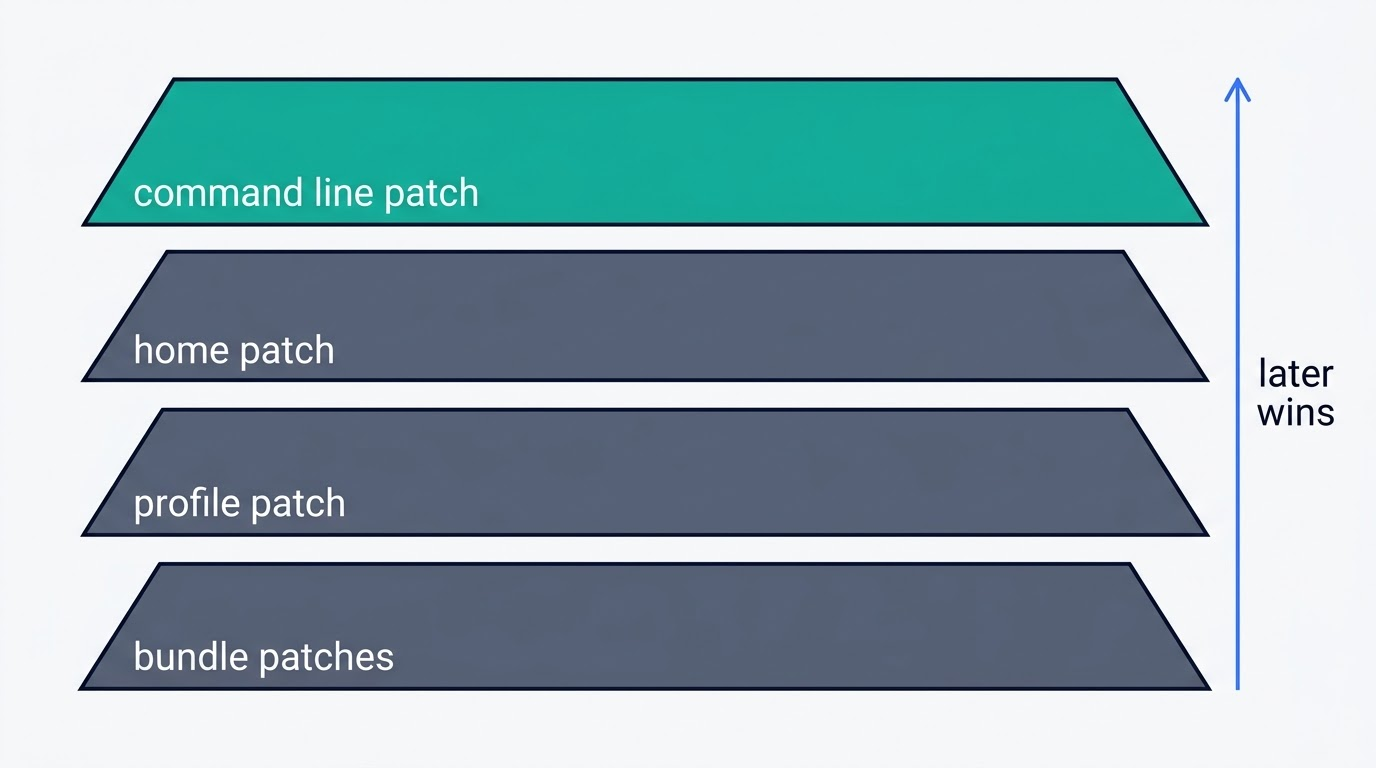
Layers apply in a fixed sequence: bundle patches from dsh.profile.bundles in order (with @deepseek-ai/dsh-base first), then the profile’s own cordis.patch.yml, then the home-level $DSH_HOME/cordis.patch.yml, then each --patch <path> in the order it appears on argv. A later layer wins, and it replaces an entire config block line for line rather than merging keys — so overriding one setting means restating every key in that block.
Built-in bundles and profile templates
The built-in bundles are dsh-base, dsh-web-app, dsh-headless, dsh-sdk-app, dsh-sdk-minimal, and dsh-acp-app; these always resolve from the dsh installation itself, while third-party bundles resolve from the profile’s own node_modules. The matching profile templates are web, headless, sdk, sdk-minimal, and acp. dsh-base supplies the shared first layer — model adapters, tools, persistence, sandboxing, confirmation policy, settings, credentials, and telemetry — and dsh-sdk-minimal is the one template that deliberately skips applying it.
Installing, Removing and Verifying Plugins
Before any of these commands make sense, it helps to know what dsh is doing underneath — the plugin CLI is a thin layer over pnpm and a configuration file, not a package manager of its own.
Here is the shortest working path from an empty profile to a verified plugin install:
- Run
dsh plugin --profile demo add ./hello-plugin. The first call to this command initializes the profile with@deepseek-ai/dsh-baseas its first bundle. - pnpm links the package into the profile’s
node_modules. - dsh appends the bundle to the profile’s bundle list.
- Run
dsh --profile demo --dump-configto print the resolved configuration, with each layer labeled, for example# == dsh-hello-plugin. - Confirm the new layer appears where expected before launching the profile.
- Restart the profile — bundle composition is fixed at startup, so add/remove/update changes only take effect after a restart.
- For ordinary patch edits (not add/remove/update), skip the restart —
cordis.patch.ymlchanges hot-reload on their own.
Removal follows the same forwarding pattern: dsh plugin --profile demo remove dsh-hello-plugin drops both the dependency and its configuration layer. In fact dsh plugin --profile <name> <args...> forwards its arguments straight into pnpm with the profile’s directory as the working directory, so add, remove, why, update, and any other pnpm verb work as long as pnpm is on PATH. Running --dump-default-config instead of --dump-config shows only the bundle layers, which is a fast way to isolate a bad patch from a bad bundle.
Installing straight from git works too — dsh plugin --profile demo add github:you/hello-plugin — but it pulls source rather than a built artifact. The package author has to ship a prepare script, and the installer has to explicitly allow it via allowBuilds: {dsh-hello-plugin: true} in the profile’s pnpm-workspace.yaml, because pnpm 10 and later block prepare scripts by default. Allowing that build means allowing the package’s code to run on the host machine outside the agent sandbox, which is why the project recommends trusting only vetted packages and pinning a commit with github:you/hello-plugin#<sha>. The safer route is an npm package that ships a built lib/, or a pnpm pack tarball. turtle-ui is a working example of a plugin distributed via git.
Where the Plugins Actually Live
There is no central plugin registry for dsh. The one official discovery mechanism is the GitHub topic dsh-plugin, which plugin authors tag their repositories with — the README explicitly asks for it. A plugin repository without that topic is, for practical purposes, invisible to anyone searching the ecosystem.
Beyond that, GitHub Discussions on the main repository has a dedicated “Show Your Plugins!” category, where authors post finished work — encrypted credential stores, conversation rollback tools, SSH tunnel forwarding for the web interface, among others. Third-party catalog sites exist too, but none of them is official, and their listed contents aren’t vetted by the DeepSeek Harness team.
Plugin vs MCP Server vs Skill
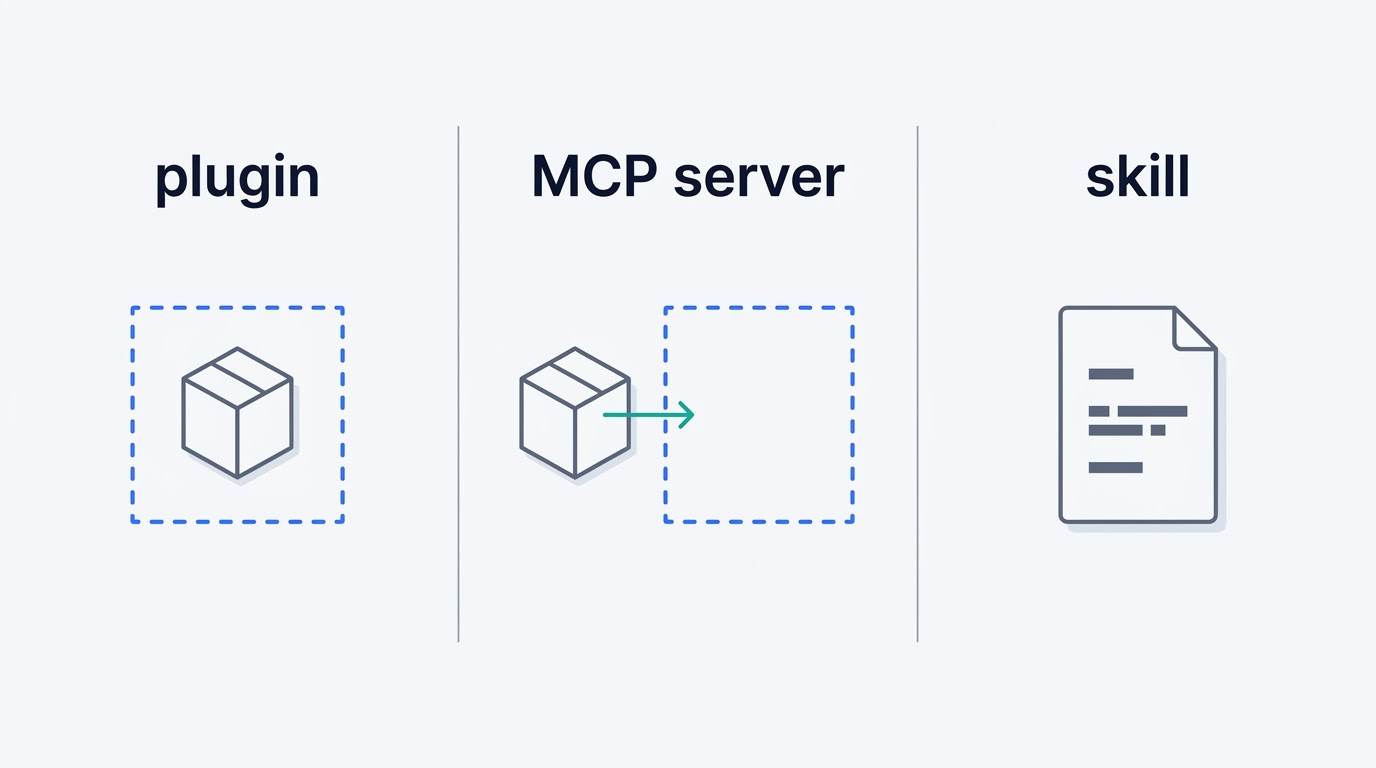
DeepSeek Harness gives developers three different extension points, and mixing them up leads to picking the wrong one for a given job.
A plugin mounts directly into the runtime and can replace anything, including the agent loop itself. An MCP server is an external process whose tools get bridged in — the @deepseek-ai/dsh-mcp-client package connects to servers over stdio or streamable-http, and their tools show up natively as mcp__github__create_issue and similar names. A skill is a text instruction recipe a user invokes as /name. A fourth option sits above all three: subagents, where a whole separate agent — including Claude Code or Codex — takes the task.
The limits worth knowing
Only Tools get bridged from MCP; resources and prompts are not supported at all. No MCP server is enabled by default, because a server’s launch command is trusted, executable code running outside the agent sandbox. Skills live inside the skill package group: a registry called dsh-skill, filesystem discovery via skill-filesystem, an official badge system called skill-badge (off by default), and a model-facing tool called tool-skill.
The agent can rewrite its own runtime
A separate extensions group gives the agent inspection and dynamic-mounting tools of its own — tool-cordis, cordis-host-runner, cordis-client-runner. The catch: anything mounted this way lives only in the running process’s memory and disappears on the next dsh restart. A snapshot of the current plugin composition is available read-only through @deepseek-ai/dsh-host-plugin-inventory, but that package cannot toggle plugins on or off itself.
| Extension point | Runs as | Can replace core behavior | Sandboxed by default |
|---|---|---|---|
| Plugin | In-process, mounted into Cordis | Yes, including the agent loop | No — runs as trusted code |
| MCP server | External process, bridged via stdio/http | No — Tools only, no resources/prompts | Not enabled by default |
| Skill | Text instruction invoked with /name | No | N/A — no code execution |
Writing Your First Plugin
The fastest way to see a change without publishing anything is the scratch overlay approach:
# scratch-plugin/cordis.yml
- insert: [{id: hello, name: /abs/path/my-plugin.ts}]
pnpm dsh web --patch ./scratch-plugin/cordis.ymlThe path to the plugin file has to be absolute — a relative path silently fails to resolve, with no plugin loaded and no obvious error pointing at the cause.
Registering a tool from inside that plugin looks like this:
import { defineTool } from '@deepseek-ai/dsh-tools'

export const inject = ['tools']

export function apply(ctx) {
  ctx.tools.register(defineTool({
    name: 'hello',
    description: 'Says hello',
    parameters: {},
    output: { schema: {}, render: () => 'hello' },
    async execute(args) {
      return { hello: 'world' }
    },
  }))
}
The core services plugins reach for most often are ctx.sessions, ctx.systemPrompt, ctx.tools, ctx.agents, ctx.agentLoop, and ctx.llm.
Once the plugin works locally, shipping it means packaging it as an npm package, declaring dsh.bundle in its package.json, tagging the repository with the dsh-plugin topic, and stating which dsh version it was verified against — that last detail matters more than usual while the whole project sits in developer preview.
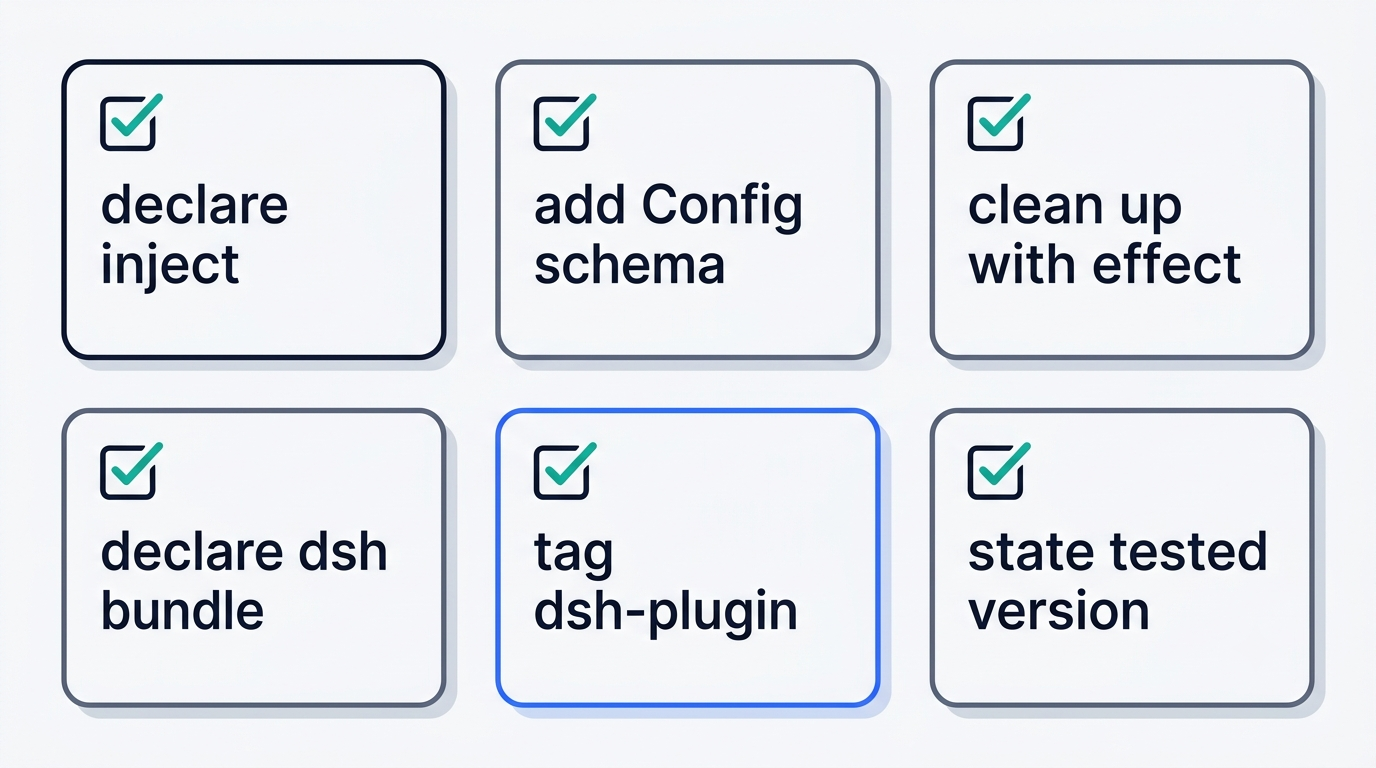
Getting comfortable with inject, bundles, and the ctx.effect pattern above is really the on-ramp to the rest of the DeepSeek Harness guide — everything else in the ecosystem, from MCP bridging to the agent’s own runtime tools, builds on these same primitives.