DeepSeek Harness Pricing: The Tool Is Free, the Tokens Are Not
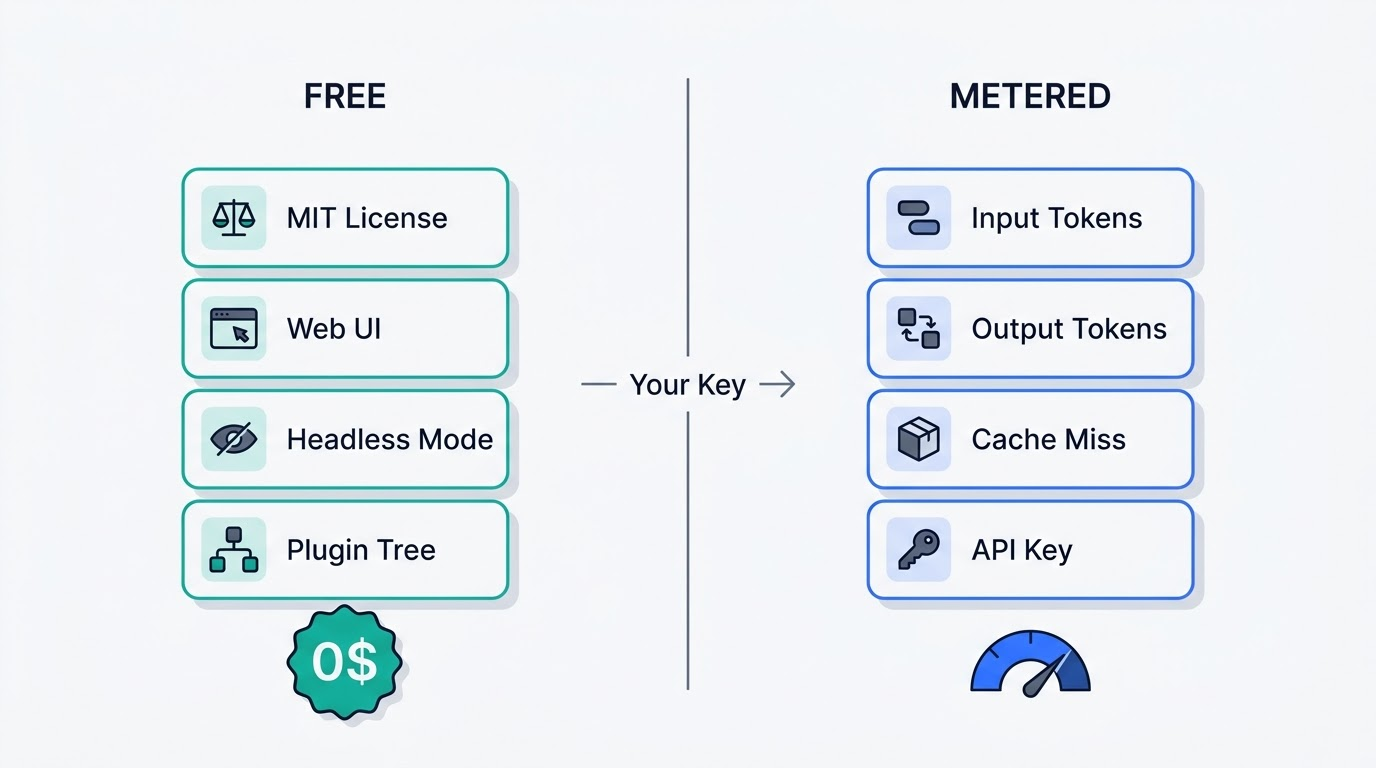
DeepSeek Harness is free software under the MIT license — no subscription, no paid tier, no seat charge. The DeepSeek Harness itself never sends you a bill; the only cost is the model tokens it burns through your own API key, and that bill is set entirely by DeepSeek’s pricing table, not by DeepSeek Harness.
DSH Field Guide is an independent community resource built by users of the dsh agent harness. It is not affiliated with, endorsed by, or operated by DeepSeek — “DeepSeek” and “DeepSeek Harness” are trademarks of their respective owner, and this page exists to translate the official pricing page into numbers an agent user can actually plan around.
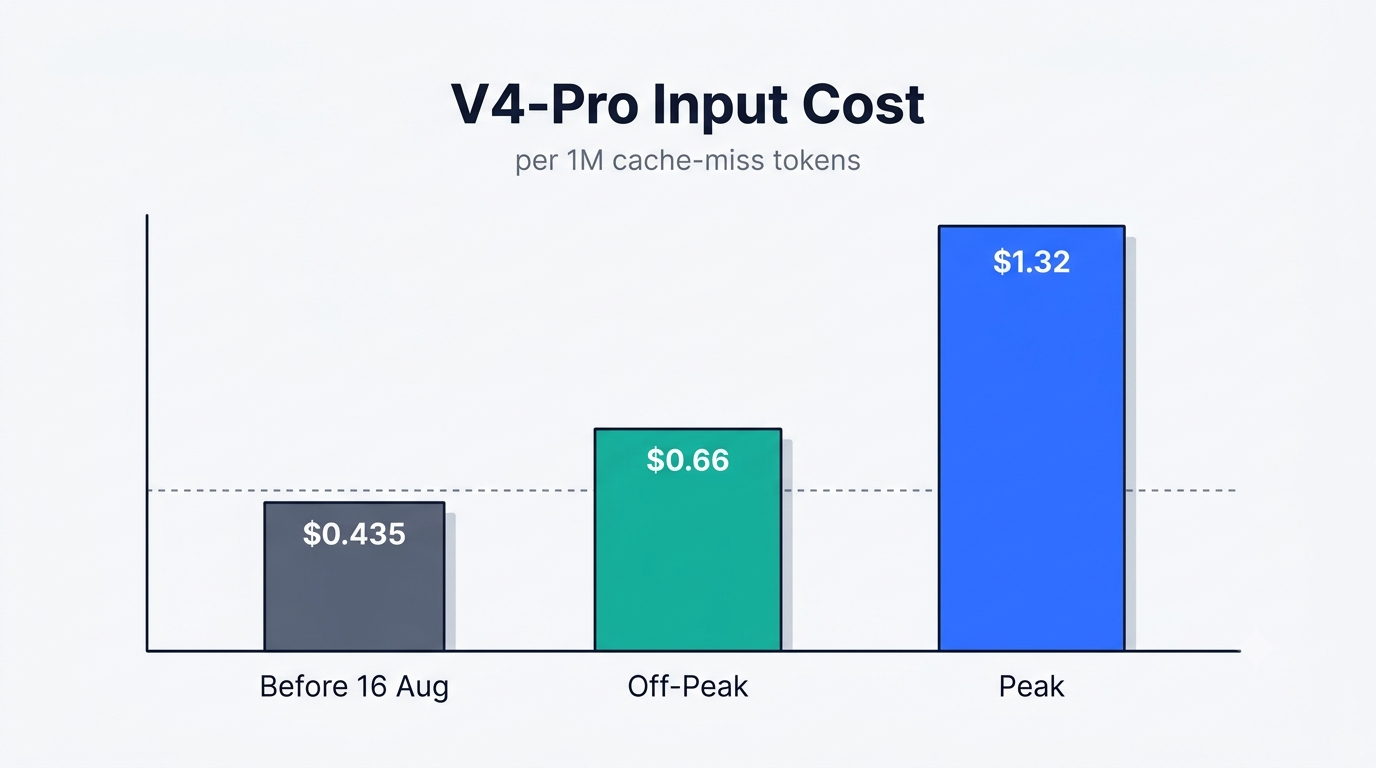
That distinction matters more than usual right now, because on 16 August 2026 at 16:00 UTC, DeepSeek’s API pricing changed sharply. Cache-miss input for V4-Pro jumped from $0.435 to $1.32 per 1M tokens at peak hours, and several cache-hit categories rose more than tenfold. The assumption that DeepSeek Harness is automatically cheaper than Claude Code no longer holds without doing the math first.
What Costs Nothing, and What Meters
| Layer | Cost |
|---|---|
| DeepSeek Harness (code, CLI, TUI, web UI, SDKs) | $0 — MIT license, no tier |
| Model API tokens (DeepSeek, OpenRouter, or self-hosted) | Metered per token by the provider |
| Self-hosting via Ollama / vLLM / LM Studio | $0 in API fees, your own compute |
Free forever: DeepSeek Harness itself
The dsh agent harness shipped publicly on 13 August 2026 under the MIT license. Web UI, TUI, headless mode, CLI, Python and TypeScript SDKs, the whole plugin tree, session logging, and sandboxing — none of it is gated. There is no subscription, no paid tier, no per-seat license, and no telemetry paywall. You can fork it, ship it inside a commercial product, and never pay DeepSeek a cent for the code itself.
Metered: every token the agent moves
The bill lives entirely at the model provider. You supply an API key, generated at platform.deepseek.com/api_keys, and dsh spends it as it works. That is the whole commercial model — your cost is not a number DeepSeek Harness publishes, it is a function of how much context your agent drags around on every turn.
The 16 August 2026 Price Change Is the Whole Story
DeepSeek API pricing has been updated, effective August 16, 2026, 16:00 UTC. New off-peak and peak-hour rates now apply across all models.DeepSeek API pricing update, api-docs.deepseek.com
What the numbers were and what they are
At 16:00 UTC on 16 August 2026, DeepSeek’s older flat pricing table stopped applying. The line every agent workload cares about most is cache-miss input on V4-Pro: it cost $0.435 per 1M tokens before the change, and now costs $0.66 per 1M off-peak and $1.32 per 1M at peak — roughly a threefold jump on the single most common category of agentic work. On several cache-hit categories, the increase runs past tenfold, a change DeepSeek confirmed on its official account alongside the update. The full grid is below.
Why it lands hardest on an agent harness
A coding agent is a context-rereading machine. It doesn’t ask one question and stop — it rereads files, diffs, tool logs, and command output across dozens of turns in a single task. Input tokens are its dominant expense by volume, and input is exactly what got more expensive. A chat interface that sends one prompt and gets one answer barely notices this change; a dsh agent harness session that reloads a repository tree on every turn notices immediately.
Peak and Off-Peak: the Same Job, Two Prices
The windows
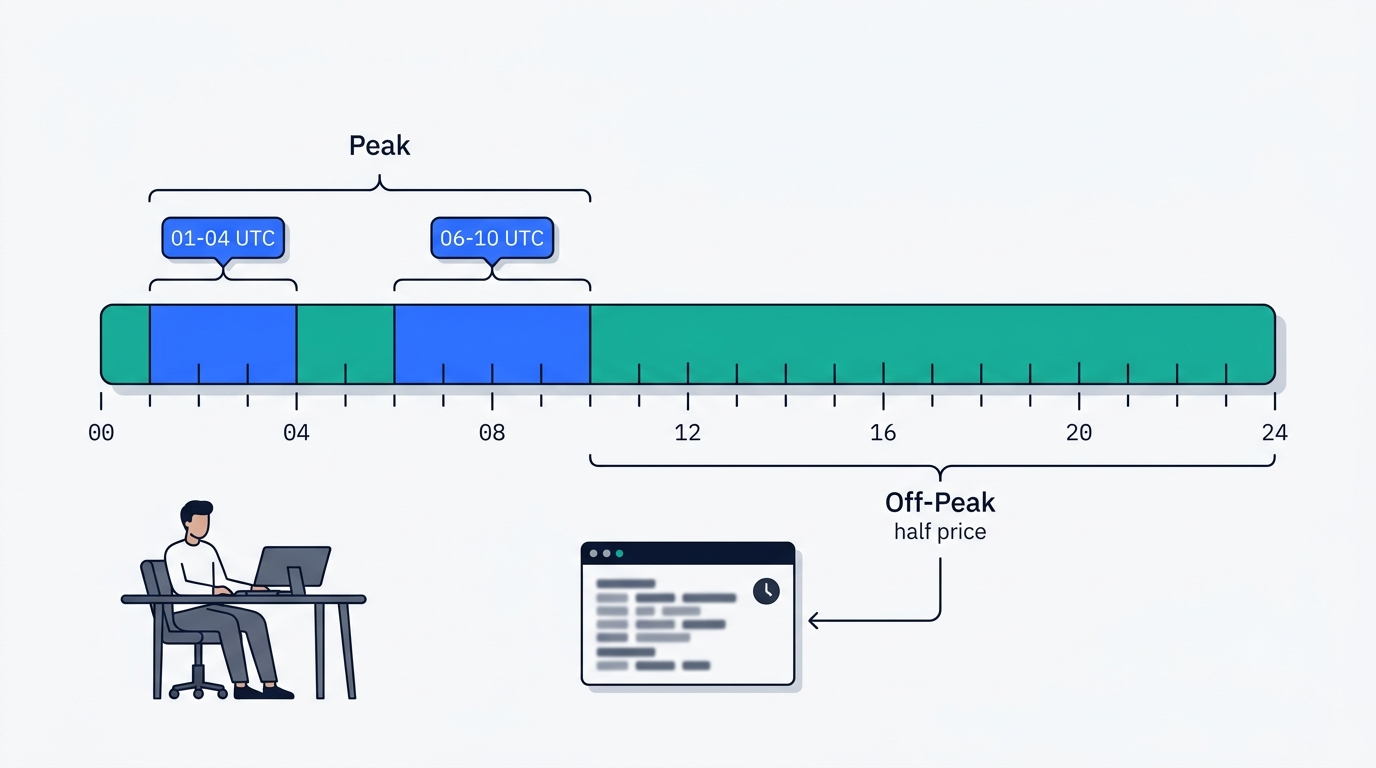
Peak windows run 01:00–04:00 UTC and 06:00–10:00 UTC, Monday through Friday. Every other hour — including all of Saturday and Sunday — is off-peak, and off-peak is exactly half the price of peak across all three metering categories — input cache hit, input cache miss, and output — for both models, per the official pricing page.
Scheduling as a cost lever
A headless run (dsh --profile headless "task") can be queued instead of fired interactively. The same refactor, launched at 14:00 UTC instead of 08:00 UTC, costs half as much for an identical result. For long batch jobs — test-suite migrations, bulk renames, doc generation — this is the single cheapest lever available before touching model choice at all.
Cache Hits Are Where the Money Actually Is
The 30x gap
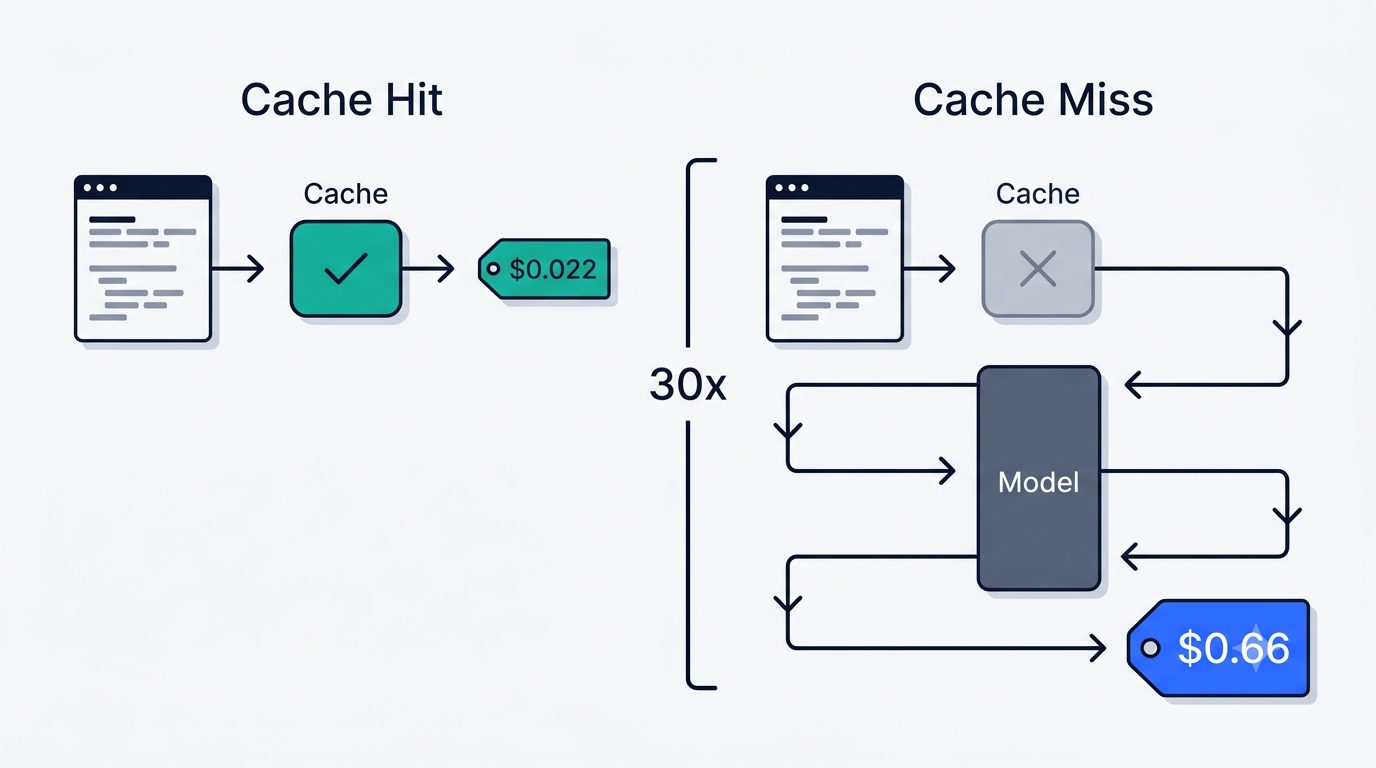
The gap between a cache hit and a cache miss on V4-Pro input is roughly thirtyfold: $0.022 per 1M off-peak / $0.044 peak for a hit, against $0.66 / $1.32 for a miss. That spread is wider than the gap between Flash and Pro, and wider than the gap between peak and off-peak. Cache hit rate is the single biggest lever on the bill, bigger than which model you pick or when you run it.
Reading your own hit rate
The web interface built into the dsh agent harness shows cache hit rate live, alongside tokens per second and turn count — most agent harnesses hide this number entirely. A real example from the community: assembling an ISS-tracker project ran roughly 20 million tokens across two turns while holding a 95–100% cache hit rate, which kept the actual spend a fraction of what the raw token count would suggest. If your hit rate reads low, the usual cause is a session structure where the stable prompt prefix keeps changing, breaking reuse of the cache.
V4-Flash or V4-Pro: When the Cheap Model Wins
| Category | V4-Flash off-peak | V4-Flash peak | V4-Pro off-peak | V4-Pro peak |
|---|---|---|---|---|
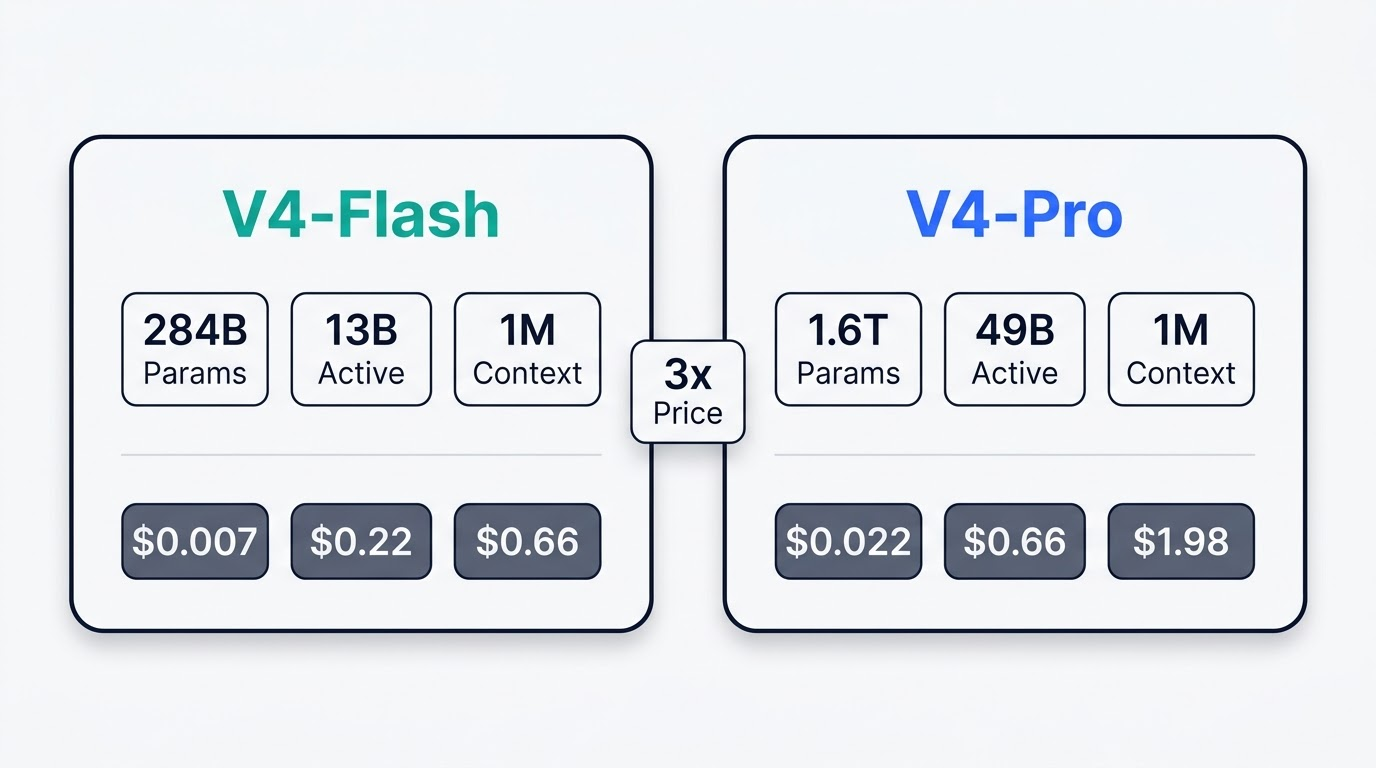
| Cache-hit input | $0.007 | $0.014 | $0.022 | $0.044 |
| Cache-miss input | $0.22 | $0.44 | $0.66 | $1.32 |
| Output | $0.66 | $1.32 | $1.98 | $3.96 |
All figures per 1M tokens, effective 16 August 2026, sourced from the official DeepSeek pricing page.
The parameter and price gap
V4-Pro carries 1.6 trillion parameters with 49 billion active; V4-Flash carries 284 billion with 13 billion active. Both offer a 1M-token context window. On price, Flash runs exactly one-third of Pro in every single category, off-peak or peak.
What Pro buys you
Benchmarks for V4-Pro-0813: 87.9 on Terminal Bench 2.1, 74.1 on Toolathlon-Verified, 71.1 on DSBench-FullStack, and 67.2 on DSBench-Hard. The practical rule that falls out of this: run Flash on high-volume routine work — renames, test scaffolding, boilerplate — and reserve Pro for tasks where the cost of a wrong answer exceeds the cost of the extra tokens.
What a Real Day of Agent Work Costs
These are estimates built from the official rate card above, not a fixed tariff — your actual bill depends heavily on your cache hit rate and how much of your session lands in peak hours.
A light day
A light day of agent work — a handful of bug fixes and a small feature, a few million tokens total, mostly off-peak, with a healthy cache hit rate above 80% — lands in low single-digit dollars on V4-Flash and roughly two to three times that on V4-Pro, since most of the volume sits in the cheap cache-hit input tier rather than cache-miss or output.
A heavy day
A heavy day — a large migration or a long multi-file refactor pulling tens of millions of tokens, run partly inside a peak window — is where Flash and Pro diverge fast, and where hit rate swings the total more than the model choice does. A session that drops from 90% hit rate to 50% can double the bill on its own, independent of which model or which hour it ran in.
The Trap: Silent Fallback to a Free Model
A dsh session launched outside its configured profile can quietly fall back to a free built-in model instead of the one you meant to pay for and use. The bill stays at zero, but so does the quality — and because nothing errors out, the only symptom is output that’s suddenly worse while metered spend doesn’t move at all.
How it happens
The usual triggers are launching without the intended --profile flag, an API key that failed to load into the session, or a model route that silently resolved to the built-in default instead of the one set in configuration. None of this throws a visible error — the agent runs, answers, and finishes the task; it just isn’t running on the model you configured.
How to catch it
dsh --profile web --dump-config prints the configuration tree that actually assembled for the session, which is the fastest way to confirm which model and key are live. Combine that with the live usage stats in the web UI: if tokens are moving but spend on your DeepSeek account dashboard stays flat, you are not on the model you think you are.
Is It Still Cheaper Than Claude Code?
The comparison that no longer works
Before 16 August 2026, the answer to “is DeepSeek Harness cheaper than Claude Code” was close to automatic. After the price change, that easy answer is gone. Anthropic’s Claude Code runs on a subscription-style billing model, DeepSeek’s API runs on strict per-token metering, and the two don’t compare cleanly without running your own numbers — cache hit rate, how much of your usage falls in peak windows, and whether Flash covers most of your workload change the outcome case by case.
The comparison that does
Where the dsh agent harness keeps an edge that the price change doesn’t touch is provider freedom: it isn’t locked to DeepSeek’s API at all. It talks to OpenRouter, any OpenAI-compatible endpoint, and local runtimes including Ollama, vLLM, LM Studio, and llama.cpp — a self-hosted model brings the per-token bill to zero. dsh can also call Claude Code or Codex as subagents inside the same session, so the choice isn’t strictly either-or; you can route the expensive turns to whichever model actually earns its cost.
Cutting the Bill: What Actually Moves the Needle
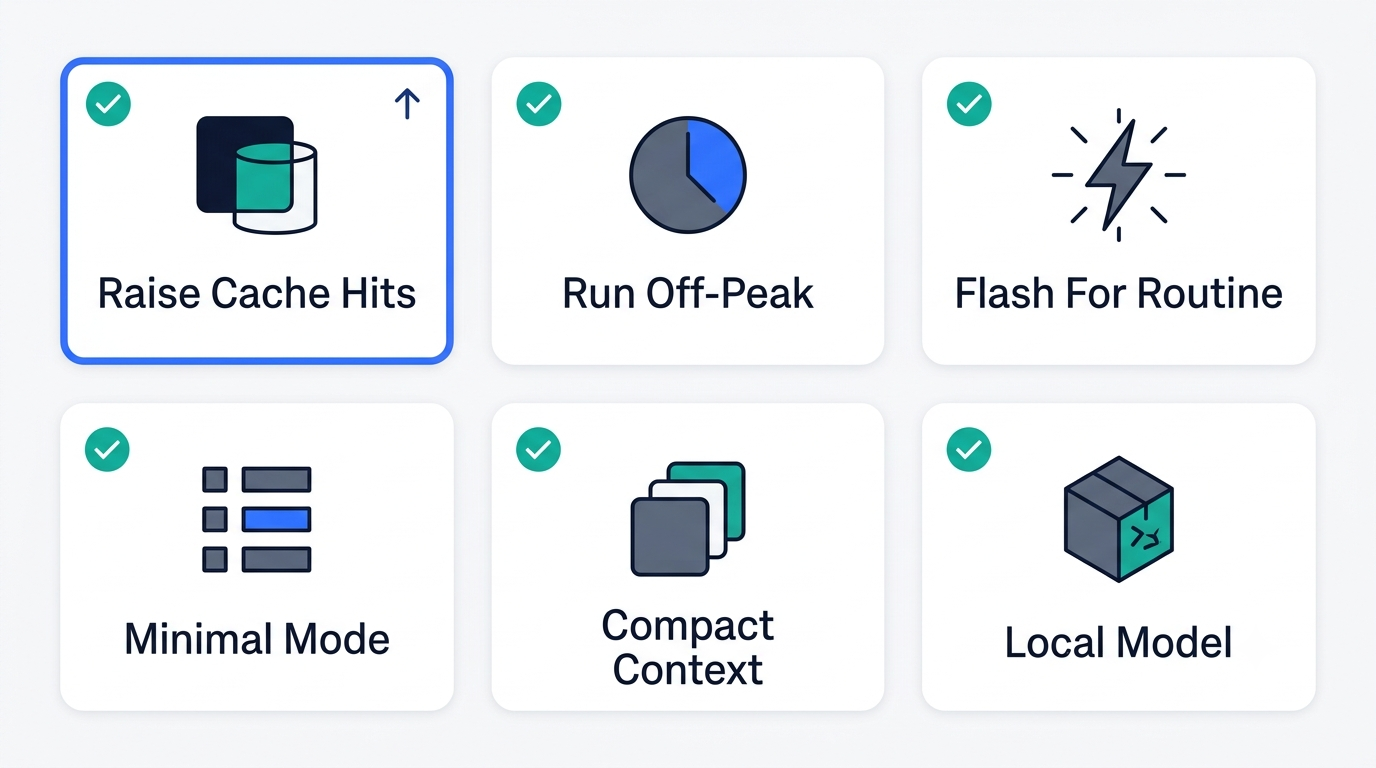
- Raise your cache hit rate. This is the single biggest lever — a 30x gap between hit and miss dwarfs every other variable on this list.
- Shift batch and headless runs off-peak. Off-peak is exactly half the price across every category, for both models.
- Default to V4-Flash for routine work. Renames, test scaffolding, and boilerplate rarely need Pro-level reasoning, and Flash costs one-third as much per token.
- Use a minimal profile when bash plus an editor is enough. Fewer tools loaded into context means fewer tokens reread on every turn.
- Compress context with a summarization plugin on long sessions. Long-running tasks accumulate stale context that keeps getting reread at full price.
- Route draft or exploratory work to a local model. Ollama or vLLM on your own hardware brings that slice of usage to zero API spend.
For a broader walkthrough of setup, profiles, and provider routing, the DeepSeek Harness guide covers configuration in more depth, including wiring in a local or alternate-provider fallback.